
What Is Workflow Automation in CRM? How It Works, Examples, and When to Use It
Key takeaway: Workflow automation in CRM sets rules so your customer system does repetitive jobs on its own: when something happens, such as a new lead arriving, the CRM checks a condition and acts, for example by assigning the lead, sending a follow-up, or updating a record.
Every sales team knows the frustration: a promising lead fills in a form, then nothing happens for hours because someone must notice it, copy the details, decide who should handle it, and remember to follow up. Workflow automation in CRM closes that gap. It turns the CRM from a filing cabinet for customer details into a system that acts on them.
Salesforce defines workflow automation as taking an often tedious, manual task and converting it to a largely automated one, so employees can spend more time on high-impact work rather than repetitive tasks. In a CRM, that idea applies to leads, deals, support cases, and renewals. Salesforce’s guide to workflow automation gives CRM examples including case creation and notifications when service lapses.
What is workflow automation in CRM?
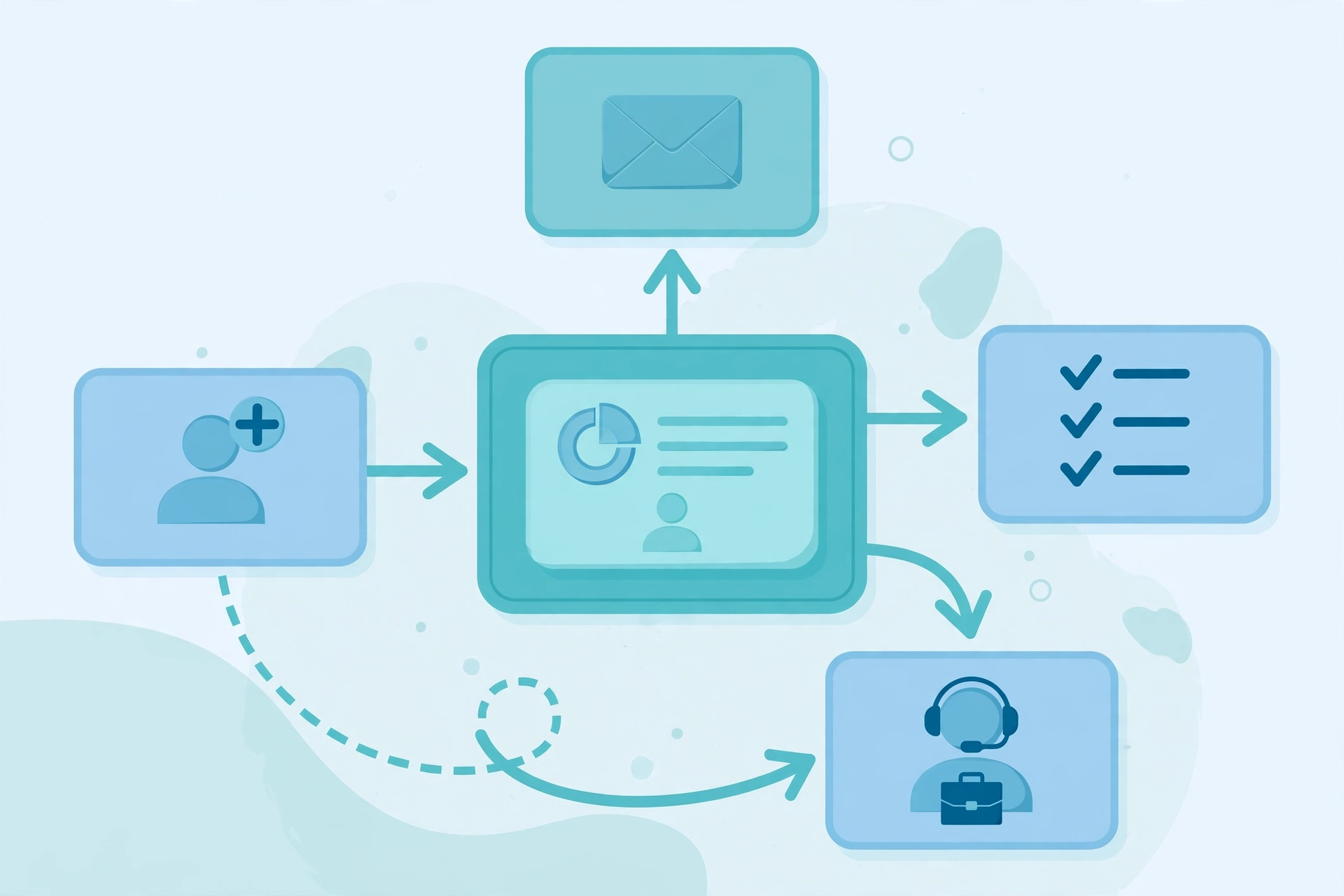
Workflow automation in CRM configures your customer relationship management system to run predefined, repetitive customer tasks automatically. Almost every CRM builder uses the same three-part logic:
- Trigger: the event that starts the workflow, such as a new form submission, a deal moving stage, or a support ticket being created.
- Condition: the rule deciding whether it should run, such as “only if the lead came from the website.”
- Action: what the CRM does next, such as assigning the lead, sending an email, creating a task, or updating a field.
In short, it is “when X happens, do Y automatically.” Insightly explains that workflow automation uses technology to reduce or remove the manual parts of a business process, freeing staff for higher-impact work rather than data entry. Insightly’s explanation of workflow automation in CRM adds that the goal is not to remove people, but to help people work more efficiently.
How workflow automation in CRM works
Take a typical inbound lead. Without automation, a rep must notice the form, create the contact, pick an owner, send a welcome email, and set a reminder. With automation, one trigger runs the chain: the CRM creates or updates the contact, checks territory or lead score, assigns the right rep and notifies them, sends a welcome email, and creates a follow-up task. If the rep does not respond in time, the workflow can escalate to a manager.
Celigo describes the same pattern across connected systems, where a trigger such as an opportunity moving to “Closed Won” can set off record creation, invoicing, and fulfilment steps. Celigo’s guide to workflow automation stresses that workflows run on triggers, rules, and data, so work moves between teams with minimal manual intervention.
Examples of workflow automation in CRM
- Lead routing: new leads assigned by territory, product, or availability, instead of sitting in a shared inbox.
- Follow-up sequences: welcome emails, reminders, and check-in tasks scheduled automatically after a form, demo, or purchase.
- Lead nurturing: prospects not ready to buy receive useful emails as they move through the buying journey.
- Deal-stage actions: when a deal moves stage, the CRM creates tasks or alerts finance and delivery teams.
- Support routing and renewals: tickets assigned by issue type, and renewal or payment reminders sent before deadlines.
For background, see our explainers on automation bots and manual process automation, and on digital automation services.
Manual vs automated CRM work
| Task | Manual | Automated |
|---|---|---|
| New lead | Rep copies details and picks an owner | CRM creates, scores, assigns, and notifies |
| Follow-up | Rep remembers to email and set a reminder | Email and task created by rule |
| Data quality | Fields filled inconsistently or left blank | Standard values enforced at each step |
| Speed | Depends on who is online | Runs immediately when the trigger fires |
Why it matters, what it costs, and what you need first
Why it matters: the benefit is consistency as much as speed. When every lead gets the same first response and follow-up window, fewer leads fall through the cracks, and managers can see where deals stall. It also protects selling time: data entry and chasing reminders quietly eat a sales day.
Cost: there is no single price. Basic workflow builders are commonly included in paid CRM tiers, so a small team may pay nothing extra beyond its existing subscription. Costs rise with advanced branching, cross-system integrations, or a third-party tool to connect apps the CRM does not cover. Budget for setup and maintenance too: a workflow nobody reviews will eventually automate an outdated process.
Prerequisites: automation works best on a process that is already clear. You need clean, standard data for source, stage, and territory; agreed lead and deal stages and response times; one owner per workflow to test and fix it; and a test record to check every action before going live. Start with one workflow, such as lead routing, prove it works, then add the next.
Risks and limits
Analysis: automation amplifies whatever it is given. Messy data means faster routing and emailing of messy records; generic copy means generic messages sent at scale. It should not replace judgment at sensitive moments such as complaints, cancellations, large deals, or pricing exceptions. The safest design automates routine steps, hands sensitive cases to a person, and escalates when a customer replies or a deadline passes. Review active workflows every few months and switch off ones nobody uses.
CRM automation is moving from fixed if-then rules toward AI-assisted routing, scoring, and drafting. The discipline stays the same: clean data, a clear process, and a human in charge of the moments that matter.
Readers: if you find USABite useful, consider adding it as a preferred source in Google Search.
Frequently asked questions
What is workflow automation in CRM in simple terms?
It is a set of rules inside your CRM that does repetitive customer jobs automatically. When a trigger happens, such as a new lead or a deal-stage change, the CRM checks a condition and then takes an action, like assigning the lead, sending an email, or creating a task.
How does workflow automation in CRM work?
It works on three parts: a trigger that starts the workflow, a condition that decides whether it should run, and an action the system performs. For example, a website form can trigger lead creation, a territory condition can pick the right rep, and the action can assign the lead and send a welcome email.
What are examples of workflow automation in CRM?
Common examples include lead routing by territory or product, automated welcome and follow-up emails, lead nurturing sequences, deal-stage task creation, support ticket routing, and renewal or payment reminders. These high-volume, repeatable tasks save the most time.
Does workflow automation in CRM replace salespeople?
No. It replaces manual data entry, routing, and reminders, not conversations, negotiation, or judgment. The best setups automate routine steps and hand sensitive moments, such as complaints, cancellations, and large deals, to a human with full context.
How do I start with workflow automation in CRM, and what does it cost?
Start with one clear workflow, such as lead routing, and test it with a dummy record before going live. Basic builders are often included in paid CRM tiers, so the main extra costs are setup and maintenance time, plus any third-party tool needed to connect other apps.
Sources
- Salesforce — What is Workflow Automation?
- Insightly — What is Workflow Automation in CRM?
- Celigo — What is Workflow Automation? Benefits and Examples




One Comment
Comments are closed.