

Unattended Automation Explained: How Bots Run on Their Own, the Best Tools, and What It Costs
Key takeaway: Unattended automation is software that runs business processes on its own — no person at the keyboard. Bots on servers or virtual machines start on a schedule or a trigger, finish whole tasks such as invoice processing end to end, and log exceptions for a human to review later. It suits high-volume, rule-based work that repeats the same way every time.
What Is Unattended Automation?
Unattended automation is a form of robotic process automation (RPA) in which software robots complete entire processes without human involvement. The bots run in the background on dedicated machines — servers, virtual machines, or cloud instances — and start automatically on a schedule, an incoming file, an email, or a system event.
UiPath, the largest RPA vendor, defines it plainly: unattended automation is “a process whereby machines perform tasks on their own, without the need for human intervention,” and it fits work that is complex, repetitive, and carried out in batches. Once set up, such work becomes fast, scalable, and able to run around the clock. Typical jobs include overnight invoice processing, payroll calculation, batch reconciliation, and report generation — high-volume work that repeats the same way every time.
How Unattended Automation Works
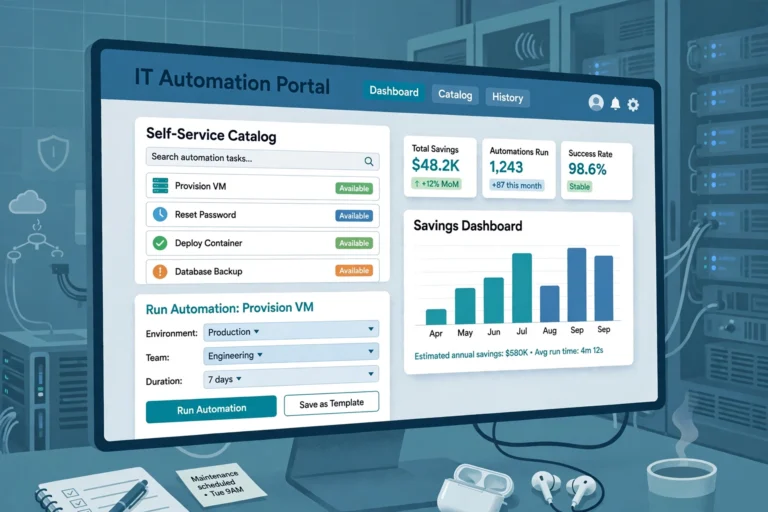
An unattended setup has three moving parts. First, a bot built in a tool such as UiPath Studio or Power Automate Desktop performs the clicks and keystrokes a person would. Second, an orchestrator (UiPath Orchestrator, Automation Anywhere Control Room, or Power Automate cloud flows) acts as the command centre: it stores the bot, hands out work, and logs every run. Third, triggers decide when work starts — a time trigger, a queue trigger, or an event such as a file arriving in a folder.
Security works differently from attended automation. Because no person is logged in, unattended bots run under dedicated robot accounts — special accounts for applications or virtual machines, not people — with elevated permissions and stored credentials. Credentials should live in a managed vault, never in a spreadsheet.
When a bot hits something it cannot handle, it logs the exception, routes it to a human specialist, and keeps working through the rest of the queue.
Attended vs Unattended Automation
The two modes answer different questions. Attended automation is a digital assistant on an employee’s own desktop, started by a person to help with part of a task. Unattended automation is a back-office worker that needs nobody at all.
| Attended automation | Unattended automation | |
|---|---|---|
| Started by | A human — a click, hotkey, or screen event | A schedule, queue item, API call, or file arrival |
| Runs on | The employee’s desktop, in an active session | A server, virtual machine, or cloud instance |
| Human presence | Required throughout | Only for exceptions and oversight |
| Best for | Call-centre lookups, live form filling, tasks needing judgement | Overnight batch work, invoice processing, payroll, reconciliations |
| Credentials | The logged-in user’s own permissions | Dedicated robot service accounts with elevated access |
| Scale | One desktop, one person at a time | Many bots in parallel, 24 hours a day |
A third pattern, hybrid automation, mixes the two: an unattended bot does the heavy prep work in the background, then hands the result to an attended bot on a specialist’s screen for the final decision. The two modes never share one machine, because attended needs an active unlocked session while unattended runs on a locked or headless one.
The Best Unattended Automation Tools
Three platforms dominate unattended RPA in 2026. UiPath holds the largest share — roughly 30% — and its Orchestrator is the reference design for unattended execution, with time and queue triggers, robot pools, and centralised logging. Microsoft Power Automate is the natural choice inside a Microsoft 365 organisation, with desktop flows that run attended or unattended. Automation Anywhere offers a cloud-native Control Room, a free Community Edition, and a Cloud Starter Pack (reported at about $750 a month, including one unattended bot).
The choice mostly follows what a company already runs: Microsoft-heavy shops get the most from Power Automate; large enterprises with complex orchestration usually land on UiPath or Automation Anywhere. See also our guide to what process automation is and the automation abbreviations in every vendor pitch.
What Does Unattended Automation Cost?
Unattended bots are priced as separate, pricier licences than attended ones. Microsoft’s published pricing makes the gap concrete: Power Automate Premium is $15 per user per month and includes attended desktop RPA, while the Process plan for unattended desktop automation is $150 per bot per month, and the Hosted Process plan (Microsoft runs the Azure virtual machine for the bot) is $215 per bot per month, all billed annually.
Market estimates disagree on size, so treat any single figure as a range. Gartner put global RPA software revenue at $3.8 billion in 2024, up 18% year over year; Grand View Research projects growth from $4.68 billion in 2025 to $35.84 billion by 2033. Mordor Intelligence reports unattended bots held 60.04% of 2025 RPA revenue — the largest share, because lights-out processing delivers the most direct labour savings. See also robotic process automation in France.
When to Use It — and When Not To
It pays off when four conditions hold: the process is high-volume, rule-based, stable, and digital end to end. Invoice matching, claims intake, and nightly reporting are textbook cases. It is the wrong tool when work needs judgement, changes often, or depends on unstructured input such as free-form emails — those cases still need a person, or an AI agent, in the loop.
Three prerequisites decide whether a first unattended bot succeeds. First, a stable process: automate the process as it actually runs, not as the manual describes it. Second, clean inputs: structured data, standard formats, and reliable system access. Third, governance from day one — robot accounts with least-privilege access, credentials in a vault, and a named owner for exceptions. The biggest risks are the quiet ones: a bot that keeps running a broken process overnight, and an exception queue nobody watches.
Analysis: Where Unattended Automation Is Heading
Analysis — our take, based on the sources above. The line between attended and unattended automation is blurring: agentic AI now lets bots handle steps that once needed a human decision, shifting attended work into unattended runs — but raising the governance stakes, because a bot that can decide can decide wrongly at 3 a.m. The practical read: unattended automation remains the cheapest way to clear high-volume, rule-based backlogs. The teams that benefit most will treat unattended bots like employees with limited authority — scheduled, supervised, audited — rather than magic that runs itself.
Frequently Asked Questions
What is unattended automation in simple terms?
Unattended automation is software that does office work with no human present. A bot on a server starts on a schedule or trigger, completes a whole process such as invoice processing, and reports back when it is done or hits a problem.
What is the difference between attended and unattended automation?
Attended automation runs on an employee’s desktop and is started by that person to help with part of a task. Unattended automation runs on a server or virtual machine, starts by itself on a schedule or event, and completes whole processes without anyone present.
How much does unattended automation cost?
It depends on the vendor. Microsoft Power Automate charges $150 per bot per month for unattended desktop automation, or $215 if Microsoft hosts the virtual machine. UiPath and Automation Anywhere price by quote or tier, and all vendors charge more for unattended than attended licences.
Do unattended bots work overnight?
Yes — that is one of their main advantages. Because no one needs to be logged in, unattended bots can run 24 hours a day, including overnight batch jobs such as payroll, reconciliations, and report generation, and log any exceptions for review in the morning.
Is unattended automation safe?
Yes, with the right setup: dedicated robot accounts with least-privilege access, credentials in a managed vault, audit logs for every run, and a human owner for the exception queue. The main risks are over-permissioned bots and exceptions nobody reviews.
Sources
- UiPath documentation — Orchestrator: Unattended automation
- SS&C Blue Prism — Attended vs Unattended RPA: What’s the Difference?
- Rework — Best RPA Software in 2026 (Gartner market figures and Microsoft pricing, sourced from microsoft.com)
- Mordor Intelligence — Robotic Process Automation Market Size & Outlook, 2031
- Guideflow — 12 best RPA software for 2026 (Microsoft pricing cross-check)



One Comment
Comments are closed.