What Is an SSL Certificate Chain? How It Works and Why It Matters
Every time you type a web address starting with https:// into your browser, a quiet security check happens in milliseconds before the page loads. If you are already familiar with how URLs and web addresses work, you know the https prefix signals an encrypted connection. What makes that connection trustworthy, however, is not just a single file on a web server—it is an SSL certificate chain.
An SSL certificate chain (also called a chain of trust or TLS certificate chain) is an ordered sequence of digital certificates that links a website’s server certificate back to a trusted Certificate Authority (CA), as explained in DigiCert’s guide to how certificate chains work. Because web browsers cannot keep a list of every legitimate website on the internet, they rely on this chain to verify that a site is genuine before exchanging passwords, payment details, or personal messages.
The Three Parts of an SSL Certificate Chain
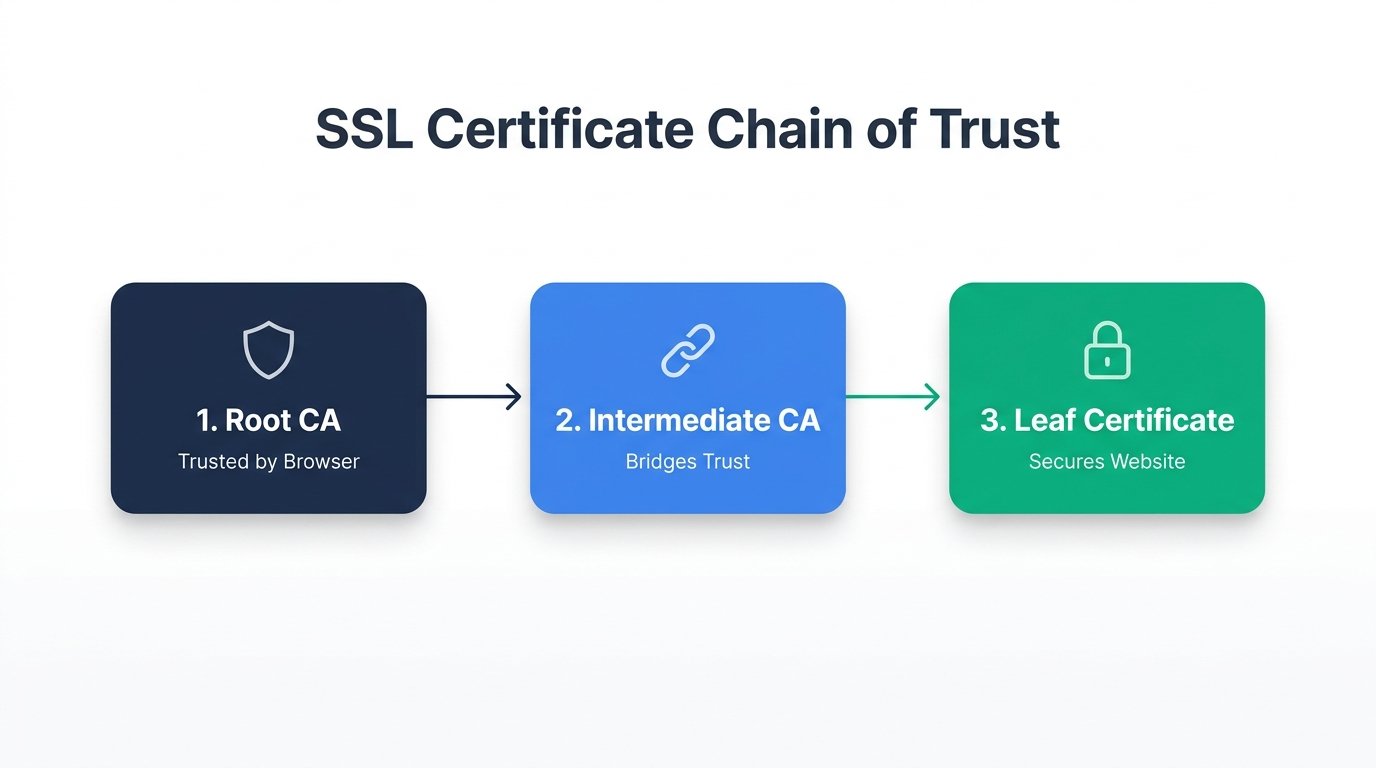
Most public HTTPS connections rely on a three-tier hierarchy. Each certificate in the path is digitally signed by the authority directly above it, creating an unbroken trail of verification from the website to your browser.
1. Leaf Certificate (Server or End-Entity Certificate)
The leaf certificate sits at the bottom of the chain and is the certificate installed directly on a website’s web server. Issued for a specific domain name (or set of domains), it contains the site’s public cryptographic key, its domain identity, its expiration date, and the digital signature of the authority that issued it, as outlined in Cloudflare’s SSL certificate overview.
2. Intermediate Certificate (Chain Certificate)
An intermediate certificate acts as the bridge between the leaf certificate and the root certificate. Instead of signing millions of individual website certificates directly with their master root key, Certificate Authorities issue intermediate certificates to handle day-to-day signing, according to Sectigo’s explanation of certificate chains. Keeping the root key locked offline adds an essential layer of protection: if an intermediate CA is ever compromised, it can be revoked and replaced without disrupting the entire root trust system. Some websites use one intermediate certificate, while others use two or more in sequence.
3. Root CA Certificate
At the top of the hierarchy sits the root CA certificate. Root certificates are self-signed by major, rigorously audited Certificate Authorities and come pre-installed inside the trust stores of modern browsers and operating systems such as Chrome, Firefox, Safari, Windows, macOS, and Android. Because your device already trusts these root certificates out of the box, web servers do not need to transmit the root certificate during a connection.
| Chain Tier | Issued & Signed By | Where It Lives | Core Role |
|---|---|---|---|
| Leaf (Server) | Intermediate CA | Website’s web server | Proves domain identity and provides the site’s public key |
| Intermediate | Root CA (or higher intermediate) | Website’s web server (bundle) | Links the leaf certificate to the root while keeping the root key offline |
| Root CA | Self-signed by the Root CA | Browser / OS trust store | Serves as the pre-trusted anchor that terminates verification |
How SSL Certificate Chain Validation Works
When you visit an HTTPS website, your browser and the server perform a TLS handshake to authenticate the server and negotiate encryption. Here is how SSL certificate chain validation unfolds step by step:
- The server presents its chain: The web server sends its leaf certificate along with any required intermediate certificates to your browser.
- The browser checks the leaf certificate: Your browser verifies that the domain name matches the site you requested, confirms the certificate has not expired, and checks its digital signature using the intermediate certificate’s public key.
- The browser follows the chain upward: It then validates the intermediate certificate’s signature against the next authority up the path until it reaches a Root CA certificate stored locally in its trust store, as detailed in Sectigo’s chain of trust guide.
- Trust is established: Once every link checks out and none of the certificates are revoked or expired, the browser completes the encrypted session and loads the page safely.
If even a single link in this sequence is missing, expired, or invalid, the verification fails and the browser displays a prominent security warning such as “Your connection is not private.”
Why an Unbroken Certificate Chain Matters for Security
A properly configured certificate chain delivers two foundational protections: authentication and encryption. Authentication stops attackers from impersonating a legitimate domain in phishing or domain-spoofing campaigns, while encryption scrambles traffic in transit so eavesdroppers cannot read login credentials or financial data.
A valid chain also helps defend against man-in-the-middle (MITM) attacks by rejecting forged, expired, or revoked certificates before sensitive data leaves the user’s device. For larger organizations managing dozens or hundreds of domains, monitoring certificate chains and renewals is a routine part of broader security hygiene—often integrated alongside automated monitoring workflows covered in our guide to cybersecurity automation tools for enterprise SOCs.
Common SSL Certificate Chain Errors and How to Fix Them
Even when a website’s main SSL certificate is valid, misconfiguring the chain can trigger browser errors. These are the three most frequent causes and how to resolve them:
- Missing intermediate certificate: This is the single most common cause of an incomplete certificate chain, according to DigiCert. A site might appear fine in a desktop browser that cached the intermediate earlier, yet fail on mobile phones, older devices, or API clients. Fix: Install the complete CA bundle (often named fullchain.pem or ca-bundle) provided by your Certificate Authority or hosting panel rather than uploading only the leaf certificate.
- Wrong SSL chain order: Servers must present certificates in the right sequence—starting with the leaf certificate first, followed by the intermediate certificate(s) in order up toward the root, as noted by Sematext. Fix: Check your concatenated .pem file (for Nginx, Apache, or a CDN) and place your domain certificate at the top, followed immediately by the intermediate certificate(s).
- Expired intermediate or outdated bundle: Renewing your leaf certificate without updating an older intermediate bundle can still break trust. Fix: Always download and deploy the fresh intermediate bundle supplied with your renewed certificate.
To check your SSL certificate chain quickly, click the site information icon next to the address bar in your browser to inspect the certificate hierarchy, or run your domain through a free online SSL checker to verify that every intermediate link is served cleanly.
Frequently Asked Questions
Do I need to install the root certificate on my web server?
No. Root CA certificates are already pre-installed in visitor browsers and operating systems. Including the root certificate in your server’s bundle adds unnecessary bytes to every TLS handshake without improving trust; you only need to install your leaf certificate and the intermediate certificate(s).
What is the difference between an SSL certificate and an SSL certificate chain?
An SSL certificate (leaf certificate) is the single digital credential issued for your specific domain. The SSL certificate chain is the full path of linked certificates—leaf, intermediate, and root—that allows a browser to trace and verify who vouches for that domain certificate.
Can a broken SSL certificate chain affect website traffic or SEO?
Yes. When a chain is incomplete or misconfigured, browsers and mobile apps block visitors with alarming security warnings, causing immediate bounce-backs. Search engine crawlers can also encounter HTTPS verification errors, which can negatively impact indexing and user trust over time.